About This Program
I created this program in the iPhone Shortcuts app to help prevent missed assignment deadlines and forgotten items in school life, while making schedules easy to keep track of.
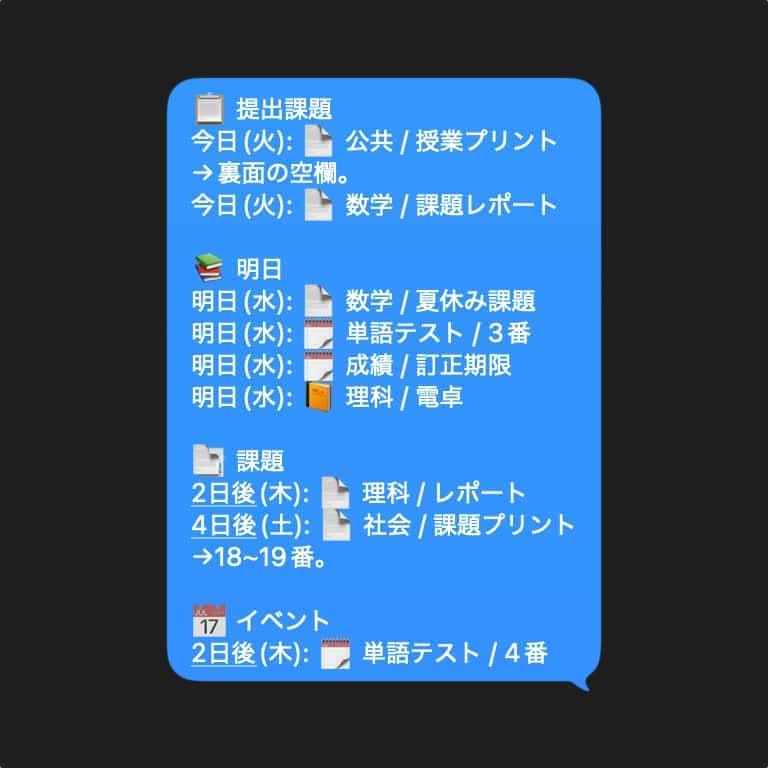
Based on the registered title and deadline, a reminder message is automatically sent at 16:00.
Types of Reminders
You can create three types of reminders depending on their purpose.
Assignment
A countdown reminder appears starting five days before the submission deadline.
A notification is also shown on the deadline day to help prevent forgotten submissions.
Event
Tests and school events can be registered and are reminded from five days in advance.
Unlike assignments, there is no reminder on the day of the event.
Items to Bring
Items you need to bring are reminded only on the previous day.
How It Works
Registering a Reminder
Run the shortcut prepared for registration and choose a reminder type from Assignment, Event, or Items to Bring.
- Event: specify the type of event
- Assignment / Items to Bring: specify the subject
Then enter the title and date to register the reminder.
Scheduling the Message
Run the message-generation shortcut before 16:00 to preview the message that is scheduled to be sent.
After confirming that the content is correct and pressing OK, the message is saved as a reminder for sending.
Sending the Message
At 16:00, an automation automatically sends the previously saved message.
Preventing Accidental Messages
Approval Before Sending
To prevent accidental messages, nothing is sent until the content has been approved in advance.
If you notice a mistake before 16:00, approving the message again will overwrite the previous content.
Showing the Message on the Screen
I also added a feature to help prevent the sender from forgetting the required items.
Sent messages are also displayed in a smartphone widget.
The widget displays photos from an album, and the album’s contents are replaced at the same time the message is sent.